



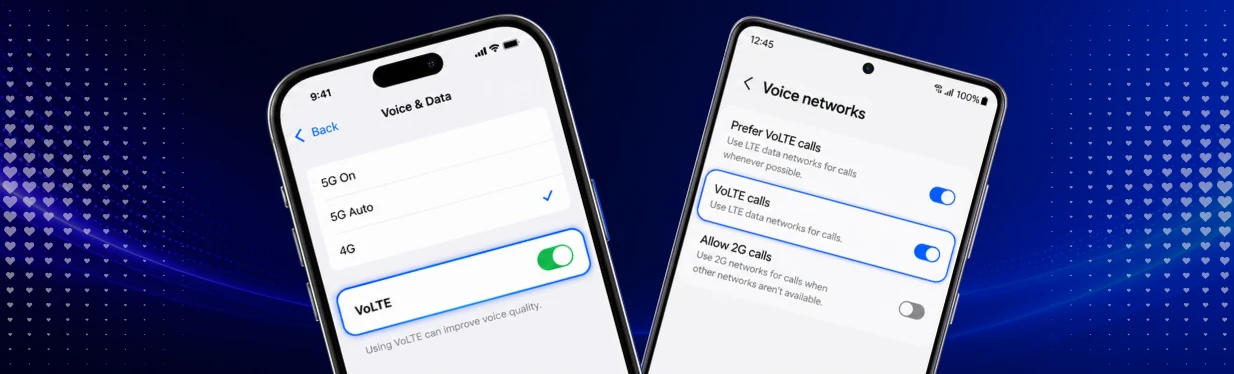
VoLTE lets you make calls over the LTE/4G network. This can provide faster call setup and better voice quality. In this guide, you’ll learn what VoLTE means, how to activate it on your iPhone or Samsung smartphone, and what to do if it isn’t working.
What Is VoLTE?
VoLTE stands for Voice over LTE. It means that phone calls are made over the LTE/4G mobile network.
In the past, calls often used a different mobile network while LTE was mainly used for mobile data. With VoLTE, you can make calls and use mobile data at the same time, provided that your smartphone and mobile network support the feature.
Does VoLTE Improve Call Quality? Advantages and Disadvantages
VoLTE can offer several benefits:
- Faster call setup
- Clearer voice quality
- The ability to use mobile data while on a call
The main limitations occur when the necessary requirements aren’t met. Your smartphone and mobile network must support VoLTE, and some older devices may not offer the feature.
What Is the Difference Between VoLTE and Wi-Fi Calling?
The main difference is the network used for the call:
- VoLTE: You make calls over the LTE/4G mobile network.
- Wi-Fi Calling: Your smartphone uses a Wi-Fi network to make the call.
VoLTE is particularly useful when you’re on the move and have a good LTE connection. Wi-Fi Calling, on the other hand, can be helpful when mobile reception is weak at home or in the office.
Find out more in our guide to Wi-Fi Calling.
Do I Need VoLTE?
VoLTE isn’t essential. On many modern smartphones, the feature is already enabled or is automatically configured through your network provider’s settings.
If your smartphone and mobile network support VoLTE, there’s generally no reason not to use it. It’s particularly useful if you want to continue using mobile data while you’re on a call.
Does My Mobile Network Support VoLTE?
Lyca Mobile supports VoLTE in Germany. To use it, your smartphone must support VoLTE and the feature must be available for your device and plan.
On many modern smartphones, VoLTE is already enabled automatically. As a result, you may not see a dedicated VoLTE switch in your settings.
How Do I Activate VoLTE on My Phone?
The exact steps depend on your smartphone, operating system version and mobile network. The setting may have a different name, or VoLTE may already be enabled automatically.
How Do I Set Up VoLTE on an iPhone?
Depending on your iPhone model and iOS version, you may find the relevant settings under:
Settings → Mobile Service → Mobile Data Options → Voice & Data
The options available can vary depending on your mobile network. On newer iPhones, VoLTE may be enabled automatically through your network provider’s settings, so there may not be a separate VoLTE switch.
If you can’t find a VoLTE option, that doesn’t necessarily mean your iPhone doesn’t support the feature.
How Do I Set Up VoLTE on a Samsung?
The menu options on Samsung smartphones can vary depending on the model and software version. You’ll often find the setting under:
Settings → Connections → Mobile Networks → VoLTE calls
The option may also be called 4G Calling. If you can’t find it, try searching your settings for “VoLTE” or “4G Calling”.
On many modern Samsung smartphones, VoLTE may already be enabled automatically.
Why Isn’t VoLTE Working on My Smartphone?
If VoLTE isn’t working, check the following first:
- Does your smartphone support VoLTE?
- Does your mobile network support VoLTE for your device and plan?
- Are you connected to an LTE/4G network?
- Is your smartphone software up to date?
- Are you using the correct SIM or eSIM?
If the VoLTE option doesn’t appear, the feature may also have been enabled automatically through your network provider’s settings.
Restarting your smartphone can also help resolve temporary connection issues.
Do I Need a Special Plan for VoLTE?
In most cases, you don’t need a special VoLTE plan. What matters is that your mobile network supports VoLTE for your plan, SIM or eSIM, and smartphone.
With a suitable Prepaid plan, you can enjoy the benefits of Lyca Mobile with flexible terms. If you prefer a mobile contract, you can also explore our mobile phone contract plans.
Does VoLTE Cost Extra?
No, VoLTE normally doesn’t come with any additional charges. VoLTE calls are billed according to the terms of your existing mobile plan.
If your plan includes unlimited calls, the included calling allowance also applies to eligible VoLTE calls.
Which Mobile Networks Support VoLTE in Germany?
VoLTE is widely available across Germany’s major mobile networks and is supported by many modern smartphones.
Lyca Mobile supports VoLTE in Germany. Whether the feature is available on your smartphone also depends on your device, plan, SIM or eSIM, and the available network connection.
Do I Need a Special SIM Card for VoLTE?
Normally, you don’t need a special SIM card for VoLTE.
If you’re using a very old SIM card or VoLTE isn’t working despite having a compatible smartphone, replacing the SIM card may help.
How Can I Turn Off VoLTE?
Whether you can manually turn off VoLTE depends on your smartphone and mobile network. On many modern devices, VoLTE is enabled automatically and can’t be disabled using a separate switch.
iPhone: If your device offers the option, you may find it under Settings → Mobile Service → Mobile Data Options → Voice & Data, depending on your iOS version.
Samsung: If your model has a dedicated switch, you’ll often find it under Settings → Connections → Mobile Networks → VoLTE calls.
If you can’t find a VoLTE switch, the feature may have been enabled automatically through your network provider’s settings.
Should I Activate VoLTE?
If your smartphone and mobile network support VoLTE, it’s generally a good idea to enable it. VoLTE can offer faster call connections, clearer voice quality, and allow you to use mobile data while making a call.
Explore our Prepaid plans or mobile contract offers. You can also learn more about making calls over Wi-Fi in our guide to Wi-Fi Calling.